How to Connect a Turntable to a Receiver
Three sockets decide this: PHONO, LINE and the ground post. Which ones your receiver has, and which ones your turntable has, settles the wiring in about a minute — and explains every way it goes wrong.
How this is funded: we earn a commission if you buy through our links, at no extra cost to you. It never changes which product we recommend, and we’ll tell you plainly when to skip one. Full disclosure.
The short answer: if your turntable has no built-in phono stage it goes to the socket marked PHONO and its ground wire goes to the GND screw beside it. If the turntable has a preamp of its own, switch it to LINE and use any ordinary input instead — AUX, CD, TAPE, anything except PHONO. Everything else on this page is the detail behind those two sentences, and the three faults that follow from getting them the wrong way round.
First, find out what each box has
Two questions, one for each end of the cable, and the answers decide everything.
Does the receiver have a PHONO input? Look along the back for a pair of RCA sockets labeled PHONO, almost always with a small screw post next to them marked GND or SIGNAL GND. The screw post is the giveaway — no other input on a receiver has one. Stereo receivers from the 1970s and 1980s nearly all have it; modern ones are split, and most AV receivers do not have it at all.
Does the turntable have a built-in phono preamp? Look for a PHONO/LINE switch on the deck’s rear panel, or the phrase “built-in preamp” in its manual. Most decks under about $400 have one — a Fluance RT81, an Audio-Technica AT-LP60X or AT-LP120XUSB all publish a switchable stage — and most decks above that deliberately do not, because the assumption is that you own something better. Our built-in preamp guide covers how to check a deck you already own.
The matching table
| Your turntable | Your receiver | What to do |
|---|---|---|
| No built-in preamp | Has a PHONO input | Straight in to PHONO, ground wire to the GND screw |
| No built-in preamp | No PHONO input | Add an external phono preamp between the two |
| Has a preamp, switched to LINE | Has a PHONO input | Use a LINE input (AUX, CD, TAPE) — not PHONO |
| Has a preamp, switched to LINE | No PHONO input | Straight in to any line input, nothing else needed |
| Has a preamp, switched to PHONO | Has a PHONO input | Use PHONO, with the deck’s own stage switched off |
| Fixed output, no switch (most all-in-ones) | Either | Line input — these decks output line level already |
One rule runs through the whole table: exactly one phono stage in the chain. Not zero, which is quiet and thin, and not two, which is loud and distorted. If you remember nothing else from this page, remember that.
Wiring it, in order
1. Power everything off. Not for safety at these voltages, but because plugging a phono cable into a live, turned-up amplifier produces a bang that no tweeter enjoys.
2. RCA cables, red to red and white to white. Red is the right channel; white or black is the left. Push each plug fully home. A plug that is half seated is the most common cause of a channel that sounds thin, drops out when the cable is touched, or disappears entirely — our troubleshooting guide starts there for exactly that reason.
3. The ground wire. Most turntables have a thin extra wire ending in a spade connector or a bare tail. It goes on the GND screw of whichever box holds the phono stage: the receiver if you are using its PHONO input, the external preamp if you added one. Loosen the screw, slide the spade underneath, tighten it onto bare metal rather than paint. Some decks — Sony’s PS-LX3BT among them — have a captive output lead and no ground wire at all, which is a design choice rather than a fault.
4. Select the input and start quiet. A phono stage feeding a 100 W receiver is a great deal of gain, and the first record is not the moment to discover where the volume control sits. Bring it up gradually.
When the receiver has no PHONO socket
This is the most common version of the question, because modern receivers mostly dropped the input. You have two honest routes and one that does not work.
Route one: use the turntable’s own preamp. If the deck has a PHONO/LINE switch, set it to LINE and use any ordinary input. This costs nothing and is the right answer for most people starting out. The built-in stages on decks like the Fluance RT81 and the AT-LP120XUSB are switchable precisely so that you can bypass them later, which means you lose nothing by using one now.
Route two: add an external phono preamp. Turntable into the preamp, preamp into a line input, ground wire onto the preamp’s post. This is the only route if your deck has no stage of its own, and it is the better-sounding one if your deck’s built-in stage is basic. Our picks under $100 cover the useful end of that market, and gain and impedance explains the two numbers that decide whether a stage suits your cartridge.
What does not work: plugging a phono-level turntable into a line input and turning the volume up to compensate. The level problem is only half of it — without RIAA equalization the tonal balance is wrong too, which is why the result sounds thin and bass-light rather than merely quiet.
Choosing a receiver with the phono input already in it
If you are buying rather than connecting what you own, a receiver or integrated amplifier with a phono input removes a box, a mains socket and two cables from the system. Two published rows matter when you compare them: whether there is a PHONO input at all, and what speaker impedance the amplifier supports, because that decides which speakers you can put on it.
The Sony STR-DH190 publishes a phono input, 100 W per channel into 8 ohms, a 6 to 16 ohm speaker impedance range, four RCA inputs, Bluetooth, FM and a headphone jack — it is the budget default for this job. The Denon PMA-600NE publishes a phono input, 70 W per channel into 4 ohms, two optical and one coaxial digital input, and an analog mode that powers down the digital circuitry, which is a genuine feature on a signal that starts at a few thousandths of a volt. Our amplifier picks rank the field on that first row, and matching an amp to speakers covers the impedance arithmetic.
One alternative worth naming: if you have not bought speakers yet, you can skip the receiver entirely. A pair of powered speakers with a phono input inside — the Klipsch R-50PM is the clearest example, with a phono switch and a ground screw terminal on its rear panel — does the amplifier’s job and the phono stage’s job in two boxes rather than four. Our no-receiver guide lays out that route in full.
Three faults, and which one you have
Quiet, thin, no bass: no phono stage in the chain. Switch the deck to PHONO if it has a switch and you are in a PHONO input, switch it to LINE if you are in a line input, or add a preamp.
Loud, harsh, uncontrollable: two phono stages. Switch the deck’s own stage off, or move the cable to a line input.
A steady hum: usually the ground wire, and the test is to touch the tonearm — if the hum drops, the earth is not landed properly. If everything is earthed and it still hums, you may have a ground loop, and removing that wire can be the fix. Hum and grounding works through all three cases, including the one that is not electrical at all.
And if the sound is right but the record will not track properly, the problem is at the other end of the chain entirely: record skipping covers tracking force, anti-skate and the rest, and leveling is the free check most people skip.
What to buy for each case, with live prices
The first two are receivers and amplifiers that publish a phono input, so a preamp-less deck plugs straight in. The third is what you add when the receiver you already own has no PHONO socket - which is most of them.
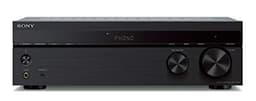
Sony STR-DH190
One box that replaces both the phono preamp and the amplifier
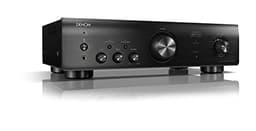
Denon PMA-600NE
A real hi-fi integrated that still has a phono input
Price as of October 12, 2026. #ad How we’re funded
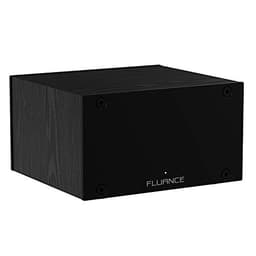
Fluance PA10
A solid mid-priced MM upgrade
Price as of October 12, 2026. #ad How we’re funded
Frequently asked questions
How do I connect a turntable to a receiver?
Run the turntable's RCA cables to a pair of inputs on the receiver, attach the ground wire to the receiver's GND screw, and select that input. Which input depends on one thing: if the turntable has no built-in phono stage, it must go to a socket labeled PHONO; if the turntable's own preamp is switched on (LINE), it goes to any ordinary line input such as AUX or CD, and never to PHONO.
How do I connect a turntable to a receiver without a phono input?
Two options. If the turntable has a built-in phono preamp, switch it to LINE and use any line input - AUX, CD, TAPE, anything but PHONO. If it does not, add an external phono preamp between them: turntable into the preamp, preamp into a line input, and the turntable's ground wire onto the preamp's ground post. A phono preamp is the cheapest box in the chain and the one that makes the difference between music and a thin whisper.
Why does my turntable sound quiet and thin through my receiver?
Because there is no phono stage in the chain. A cartridge puts out a few millivolts and the signal carries the RIAA curve, which cuts bass and lifts treble on the way to the record. Without a phono stage to reverse that and add gain, you get exactly what people describe: quiet, thin and bass-light. Either switch the deck's own preamp on, move to the PHONO input, or add an external preamp.
Why is my turntable distorted and far too loud?
The opposite fault: two phono stages in series. A deck with its built-in preamp switched on, plugged into a receiver's PHONO input, has its signal amplified twice and equalized twice. Switch the deck to LINE, or move the cable to a line input. Nothing is damaged by the mistake, but it will sound harsh and uncontrollable until you fix it.
Where does the turntable ground wire go on a receiver?
On the small screw post next to the PHONO input, usually marked GND or SIGNAL GND. Loosen it, slide the spade under it, tighten it onto bare metal. If you are using an external phono preamp instead, the wire goes to that unit's ground post rather than to the receiver - the rule is that the earth lands on whichever box contains the phono stage.
Can I connect a turntable to an AV receiver?
Yes, and the same rules apply. Very few modern AV receivers include a phono input, so in practice you will be using the turntable's own preamp switched to LINE, or adding an external phono stage, and plugging into any analog stereo input. Check that the input you choose is a true analog input and that the receiver is not applying surround processing to it - most have a 'direct' or 'stereo' mode worth selecting for records.
Do I need a special cable to connect a turntable?
No. A standard stereo RCA cable carries the signal, and most turntables come with one attached or in the box. What matters is not the cable's price but its routing: keep it away from mains leads and power bricks, because the phono signal is small enough to pick up hum from them. If your deck has detachable output cables, keep the run short.
Is a receiver with a phono input better than an external preamp?
Neither is automatically better - they are different purchases. A receiver with a phono input is fewer boxes, fewer cables and usually less money overall; the Sony STR-DH190 publishes a phono input plus 100 W per channel. An external preamp can be chosen for your cartridge and upgraded independently, and it is the only route if you already own a receiver without PHONO. What matters is that exactly one of them is in the chain.
Sources
- Crutchfield — Intro to home audio power amplifiers and preamps — On the preamp/power-amp split, integrated amplifiers and impedance stability (accessed August 11, 2026)
- Crutchfield — How to choose a phono preamp — On why a phono signal needs a preamp and never running two at once (accessed July 24, 2026)
- Crutchfield — How to choose the right turntable — Buying-guide reference on drive type, cartridges, preamps and setup (accessed July 24, 2026)
- Elliott Sound Products — Phono preamp / RIAA equalization — Technical reference on RIAA pre-emphasis and the inverse playback curve (accessed July 24, 2026)
- Audio-Technica — AT-LP120XUSB user manual, full published specification — The complete published table, re-read in full on this date (this manual was previously cited on this site only for the deck's dimensions). Turntable: type "Direct drive", motor "DC servo motor", "3-speed, fully manual operation" at 33-1/3, 45 and 78 RPM, die-cast aluminum platter, starting torque "> 1.0 kgf.cm", braking system "Electronic brake", wow and flutter "< 0.2% WRMS (33 RPM) at 3 kHz", signal-to-noise "> 50 dB", output PHONO "4 mV nominal at 1 kHz, 5 cm/sec" and LINE (MM) "240 mV nominal at 1 kHz, 5 cm/sec", phono pre-amp gain "36 dB nominal, RIAA equalized". Tonearm: "Static balanced S-shaped tonearm", effective length 230.5 mm, overhang 16 mm, maximum tracking error angle "Less than 3", stylus pressure adjustment range "0 to 4 g", applicable cartridge weight range "3.5 to 8.5 g". Cartridge and headshell: AT-VM95E, VM type, 47,000 ohms recommended load, 4.0 mV output, "0.3 x 0.7 mil bonded elliptical stylus", aluminum pipe cantilever, tracking force range "1.8 to 2.2 g (2.0 g standard)", cartridge weight 6.1 g, headshell AT-HS6 at 9 g including lead wire, headshell overhang adjustment "+/- 5 mm". USB function "16 bit 44.1 kHz or 48 kHz USB A/D, D/A selectable", computer interface "USB 1.1 Compliant". General: 452.0 mm (17.80") x 352.0 mm (13.86") x 141.6 mm (5.57"), 8 kg (17.6 lbs) without dust cover, 2.75 W, replacement stylus AT-VMN95E, replacement headshell AT-HS6, with a stylus target light, USB cable and RCA audio cable in the box (accessed October 5, 2026)
- Crutchfield — Understanding speaker and amplifier wattage ratings — On RMS versus peak power, and matching an amplifier's output to a speaker's rating (accessed August 11, 2026)
Keep reading
Best Amplifiers for a Turntable
Receivers and integrated amps ranked on whether the phono input is really there.
See the picksDo I Need a Phono Preamp?
The question underneath this page, answered in two sentences then explained.
Read the guideConnecting a Turntable Without a Receiver
The other half of the decision: powered speakers instead of an amplifier.
Read the guideTurntable Hum and Grounding
If it hums once it is wired, this is the diagnostic order to work through.
Read the guide