How to Record Vinyl to a Computer
The hardware question is simple. The three that actually decide the result are what you record into, what level you set, and how clean the record was.
How this is funded: we earn a commission if you buy through our links, at no extra cost to you. It never changes which product we recommend, and we’ll tell you plainly when to skip one. Full disclosure.
Digitizing records is one of those jobs where the equipment question gets all the attention and the three decisions that actually determine the result get none. Those three are: whether there is a phono stage in the chain, what level you record at, and how clean the record was when you played it.
Get those right with modest hardware and you will produce a better file than someone with expensive hardware who got them wrong.
Step one: a line-level signal, one way or another
A computer’s audio input expects a line-level signal — the same thing an amplifier’s AUX socket expects. A turntable’s raw output is roughly a hundred times quieter and still has the RIAA curve applied. Feed that straight into a laptop and you get a faint, thin recording that no amount of processing rescues.
Two ways to solve it:
A USB turntable. The deck contains the phono stage and an analog-to-digital converter, and presents itself to the computer as an audio input device. Plug in, select it as the recording source, done. The AT-LP120XUSB is the usual recommendation because it does this with a properly adjustable tonearm attached; the Sony PS-LX3BT offers full automation instead, though its USB output is the one spec Sony and its reviewers contradict each other on — confirm it with the retailer before you buy the deck for this job. The whole field is in best USB turntables.
Any turntable plus an audio interface. Take a line-level output — from the deck’s own preamp switched to LINE, or from a separate phono stage — and run it into a USB audio interface with line inputs. This route is better if you already own a good deck, because it lets you use the phono stage you want rather than the one built into a USB turntable.
What does not work: a phono output into a laptop’s microphone jack. Wrong level, wrong impedance, no RIAA correction, and usually mono.
Step two: clean the record, because the file is forever
This is the step people skip and then regret. A record played once has its surface noise, and you hear it and forget it. A record recorded once has that noise baked into a file you will keep for years.
Brush the record before the pass, wet-clean it if it is dirty, and clean the stylus — a stylus carrying a collar of dust adds noise of its own. How to clean vinyl records has the procedure and the cleaning fluid roundup covers what to use.
This does more for the finished recording than any software processing, and unlike software processing it has no side effects.
Step three: 24-bit, and why the bit depth is the part that matters
The sample-rate argument gets far more airtime than it deserves. A record’s usable frequency range is comfortably covered by 44.1 or 48 kHz, and its surface noise sits well above the noise floor of either. Recording at 96 or 192 kHz doubles or quadruples your file sizes to capture information the source does not contain.
Bit depth is different. 24-bit gives you a much larger dynamic range than 16-bit, and the practical benefit is headroom: you can set a conservative recording level, well below clipping, and still have a recording with no audible noise penalty when you normalize it afterwards. At 16-bit you have to push the level closer to the ceiling, which is where accidents happen.
So: 24-bit / 44.1 or 48 kHz, and spend the attention you saved on the level meter.
Step four: setting the level without clipping
Digital clipping is not like analog overload. There is no gentle compression at the top — the waveform is simply truncated, and it sounds like a harsh crackle that no processing removes.
The method: find the loudest passage on the side — usually the first track, often a chorus — play it, and adjust the input gain until the meters peak around minus 6 dBFS. That leaves 6 dB of headroom for a transient you did not anticipate.
On a USB turntable with a gain switch, like the Sony, set the switch first and then trim in software. Getting the hardware setting roughly right means the software is not amplifying a signal that arrived too quiet.
Step five: record the whole side, split afterwards
Do not try to start and stop recording between tracks. Two reasons: you will clip the beginnings and ends of songs, and a mis-timed stop can lose the whole side.
Instead, start recording a few seconds before you cue the needle and stop a few seconds after the run-out. Then find the inter-track silences in the waveform — they are visually obvious — and split there. Most editors have a one-key split at the cursor.
Two practical notes. Leave about a second of silence at the head of each split track rather than cutting right up to the first note. And do the splitting before any noise reduction, so you are working on the untouched audio.
Click removal: use sparingly
Automated de-clicking works by detecting sudden discontinuities and interpolating across them. On isolated ticks it is genuinely good. Pushed hard, it starts treating legitimate transients — a cymbal hit, a plucked string, a snare — as clicks and softening them.
The sane workflow: keep the untouched 24-bit master, apply gentle de-clicking to a copy, and A/B the two on headphones before committing. If in doubt, less processing. A file with a few audible ticks sounds like a record; a heavily processed one sounds like a record played through a blanket.
And if the record clicks constantly rather than occasionally, the fix is upstream: clean it again, or accept that the groove is damaged. See record cleaning machines if you have a lot of records in that condition.
What to keep, and in what format
- The master: the unsplit, unprocessed 24-bit file, in WAV or FLAC. This is the one you cannot regenerate without playing the record again.
- The archive: split, tagged, lightly processed, FLAC. Lossless, about half the size of WAV, and it carries tags properly.
- The listening copy: MP3 at a high bitrate or AAC, for a phone or a car.
Tag as you go. A folder of two hundred files named “Track 01” is a project you will never finish sorting out later.
One thing that will not improve the recording
A better analog-to-digital converter, at this level. The weakest links in a vinyl transfer are, in order: the condition of the record, the stylus, the phono stage, and the level you set. The converter in a mid-range USB turntable or a modest audio interface is not what is limiting your result.
If you want the transfer to sound better, the highest-value changes are a better cartridge, a better phono stage, and cleaner records — in that order.
What the job needs
A USB turntable is the shortest route. If your deck has no USB output, a line-level signal into any audio interface does the same job — and cleaning the record first does more for the result than any software.
USB deck with an adjustable arm
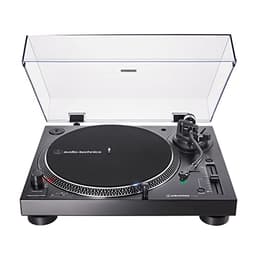
Audio-Technica AT-LP120XUSB
Digitizing records and learning proper setup
Fully automatic — confirm its USB output first
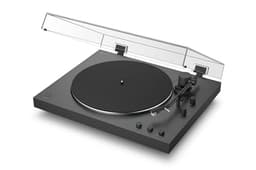
Sony PS-LX3BT
One deck that connects to anything, wired or wireless
Price as of October 13, 2026. #ad How we’re funded
Clean it before you capture it
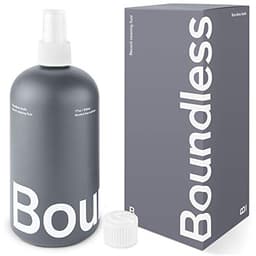
Boundless Audio Record Cleaning Solution (17 oz)
Regular cleaning of a real collection, at the lowest cost per side
Frequently asked questions
Do I need a USB turntable to record vinyl to a computer?
No. A USB turntable is the most convenient route because it contains the phono stage and the analog-to-digital converter, but any turntable works if you feed a line-level signal — from its own preamp or a separate phono stage — into an audio interface. What you cannot do is plug a raw phono output into a computer's microphone input and expect a usable result.
What sample rate should I use to record vinyl?
24-bit at 44.1 or 48 kHz. The bit depth is the part worth caring about: 24-bit gives you enough headroom to set a conservative recording level and normalize afterwards without noise. Higher sample rates make much larger files and add nothing audible when the source is a record.
What recording level should I use for vinyl?
Aim for peaks around minus 6 dBFS on the loudest passage of the side. Digital clipping is permanent and unpleasant, and a record's loudest transient can be well above its average level. At 24-bit there is no penalty for recording conservatively and raising the level afterwards.
What free software can I use to record vinyl?
Any audio editor that records from an input device and lets you split and export will do the job — the workflow described here is identical across them. The functions to look for are level meters, a waveform view for finding track boundaries, and export to FLAC or WAV.
Should I remove clicks and pops from a vinyl recording?
Sparingly, and always keep the untouched original. Automated click removal works well on isolated ticks and starts damaging transients — cymbals and plucked strings especially — when pushed. Cleaning the record before you record removes far more noise than any software, with no side effects.
Why does my vinyl recording sound thin and quiet?
Almost always because there is no phono stage in the chain: you are recording the raw cartridge output with no gain and no RIAA correction. Switch the turntable's PHONO/LINE switch to LINE, or add a phono preamp between the deck and the interface.
Is it legal to record my own records?
Copying music you own for your own personal use is treated permissively in many places, but the details vary by country and we are not the right people to advise on it. Distributing or sharing the files is a different matter entirely and is not covered by any personal-use allowance.
Sources
- Crutchfield — How to choose the right turntable — Buying-guide reference on drive type, cartridges, preamps and setup (accessed July 24, 2026)
- Crutchfield — How to choose a phono preamp — On why a phono signal needs a preamp and never running two at once (accessed July 24, 2026)
- Library of Congress — Caring for and cleaning grooved discs — Preservation guidance on cleaning and storing records to prevent damage (accessed July 24, 2026)
- Elliott Sound Products — Phono preamp / RIAA equalization — Technical reference on RIAA pre-emphasis and the inverse playback curve (accessed July 24, 2026)
Keep reading
Which Pressing Should You Buy?
If you are digitizing, the edition you start from decides the result.
Read the guideBest USB Turntables
The decks with the converter built in, ranked.
See the picksAudio-Technica AT-LP120XUSB Review
The standard answer for digitizing a collection.
Read the reviewHow to Clean Vinyl Records
The step that improves a digital transfer more than any software.
Read the guidePhono vs Line
Why a raw phono output cannot go straight into a computer.
Read the explainer